
Drilling Simulator2.5 - App Store
You'll be able to see results in few seconds.
Publisher Description
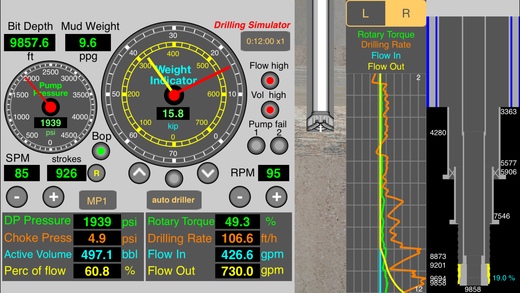
Drilling Simulator - Introductory level provides a graphical very useful tool for training of roughnecks, derrickmen, drillers and students in basic drilling concepts and in the kick detection based on the behavior of the parameters during the drilling an oil well and of the behavior of kick in the well after the shut-in the well.
For new features, report bugs, improvements and suggestions please contact us: contact@wellcontrol.com.br
- Drilling (instruments, bit rotation, geolograph, neutral point);
- Capacities and Volumes;
- Hydraulics and Hydrostatics;
- Alarms Monitoring;
- Kick Detection;
- Hard Shut-in the well;
- Behavior of the kick;
Notes:
1- This app NOT allows to control the well after the kick detection and shut-in.
The simulation ends after the simulations of underground blowout and blowout to surface.
2- After the drilling, kick detection, shut-in and stabilisation of pressures, save to iCloud and import the data file from the another app "Well Control Simulator" to control (buy it from our portfolio on the App Store).
3- Check also for other apps from our portfolio on the App Store:"Leak-Off Test Simulator", "Well Control Methods", "Well Control Methods", "Drilling Hydraulics","Kick Tolerance"
These tools can complement (work with) this simulator by creating files which can be used in this application;
Features:
1) Panel with the following parameters: pump pressure, mud pump speed, strokes totalizer, flow rate, mud weight, bit depth, rotary speed, hookload and weight on the bit;
2) Instruments with pointers to the parameters: pump pressure, hookload and weight on the bit;
3) Geolograph with parameters: drillpipe pressure, choke pressure, active volume, percent of flow, rotary torque, drilling rate and flow in, flow out.
4) Panel with alarms: pump failure, vol high, flow high, bop failure and bop status;
5) Well Config, Circulation Options, Set Alarms, Graph Limits, X-times faster, Pause/Continue, Restart, Send by email, about and Hydraulics;
6) set drillstring with drillpipe, heavy-weight, drillcollar 1 and drillcollar 2;
7) Select floating rig or land rig;
8) Select unit systems: METRIC, SI, field1 (imperial) and field2 (mix);
9) set fluid parameters: mud weight, plastic viscosity, yield point and initial gel;
10) Select rheological models: Power or Bingham;
11) Set gradients: fracture and temperature;
12) Set jet nozzles or fixed TFA;
13) Set choke parameters and BOP test pressure;
14) Set Surface circulation volume;
15) Set surface circulation equipments (mud pump and lines);
16) Set four formations to drilling (height, pore gradient, fluid density and sof/hard);
17) Save configuration to data files;
18) Select circulation options: drillpipe -> Riser, Kill -> Riser, Close/Open (Hard shut-in) the well;
19) Set alarms: pit gain, flow rate out, max pump pressure and max pump power;
20) Register the kill line losses and pump pressure at the kill speed;
21) show the well with drillstring and neutrl point and show the drillbit on rotating;
22) Show schematic of well with drillstring, kick and neutral point (%);
23) Adjust pump speed, weight on the bit and rotary speed to drilling until kick detection;
24) Shut-in the well using hard method;
25) Register shut-in drillpipe pressure (SIDPP) and choke pressure (SICP) and gain volume;
26) behavior of the kick: keeping the well closed and keeping the well opened;
27) Simulations: Underground Blowout at casing shoe and blowout with failure of bop;
28) Capacities and Volumes calculations;
29) Hydrostatic and critical pressures calculations;
30) Hydraulics calculations;
DISCLAIMER:
These tools & materials are provided 'as is' without warranties of any kind, express or implied.
Please verify the tools provided by this application by yourself before you use them. Ensure you understand the impact of using these tools.
Any use you choose to make of these tools & materials is undertaken by you entirely at you own risk.
Requires iOS 7.0 or later. Compatible with iPhone, iPad, and iPod touch.
About Drilling Simulator
The company that develops Drilling Simulator is Carlos Moura. The latest version released by its developer is 2.5.
To install Drilling Simulator on your iOS device, just click the green Continue To App button above to start the installation process. The app is listed on our website since 2011-06-06 and was downloaded 0 times. We have already checked if the download link is safe, however for your own protection we recommend that you scan the downloaded app with your antivirus. Your antivirus may detect the Drilling Simulator as malware if the download link is broken.
How to install Drilling Simulator on your iOS device:
- Click on the Continue To App button on our website. This will redirect you to the App Store.
- Once the Drilling Simulator is shown in the iTunes listing of your iOS device, you can start its download and installation. Tap on the GET button to the right of the app to start downloading it.
- If you are not logged-in the iOS appstore app, you'll be prompted for your your Apple ID and/or password.
- After Drilling Simulator is downloaded, you'll see an INSTALL button to the right. Tap on it to start the actual installation of the iOS app.
- Once installation is finished you can tap on the OPEN button to start it. Its icon will also be added to your device home screen.
Program Details
System requirements
Download information
Pricing
Version History
version 2.5
posted on 2011-06-06
Disclaimer
Official App Store Link
We do not host Drilling Simulator on our servers. We did not scan it for viruses, adware, spyware or other type of malware. This app is hosted by Apple and passed their terms and conditions to be listed there. We recommend caution when installing it.
The App Store link for Drilling Simulator is provided to you by apps112.com without any warranties, representations or guarantees of any kind, so access it at your own risk.
If you have questions regarding this particular app contact the publisher directly. For questions about the functionalities of apps112.com contact us.
